In my first post I described the taskbar and the other small tools I built after moving from Windows to COSMIC. The tool I now use most is a different one: a patched COSMIC Text Editor with the Notepad++ habits I missed.
What it does
Session restore. Like Notepad++, the editor brings back every tab from last time, including unsaved changes and untitled drafts, with the cursor, the scroll position and the window size. Closing the window does not ask to save; closing a single tab with unsaved changes still does.
One window. Opening a file while the editor runs, by double-click or “Open with”, adds a tab to the running window and brings it forward, instead of opening a second window.
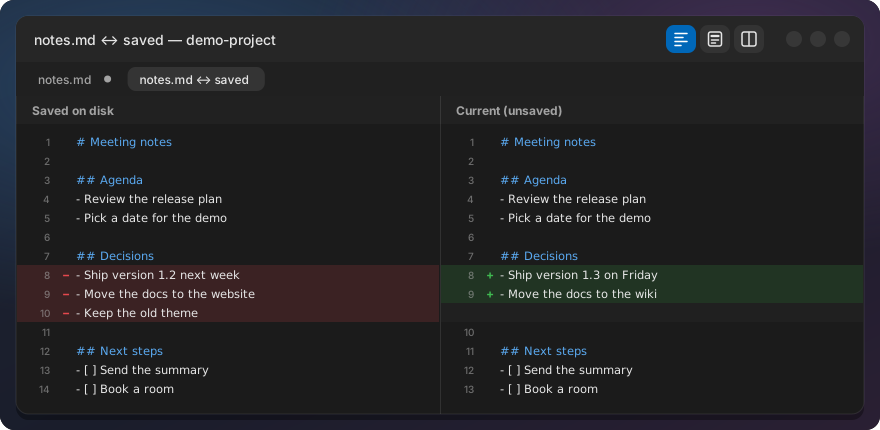
Change marks. A thin bar left of the line numbers shows what I changed: orange for unsaved, green for saved in this session. Inside an orange line the changed words are tinted. A click on an orange bar, or Compare with saved, shows my unsaved changes against the file on disk.
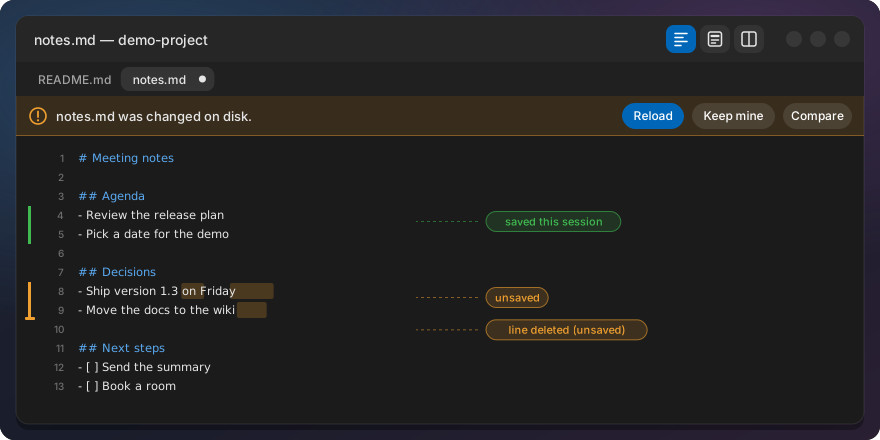
Changed on disk. When another program changes a file I have unsaved edits in, a bar asks: Reload, Keep mine or Compare. Save never writes over a change it has not shown me.
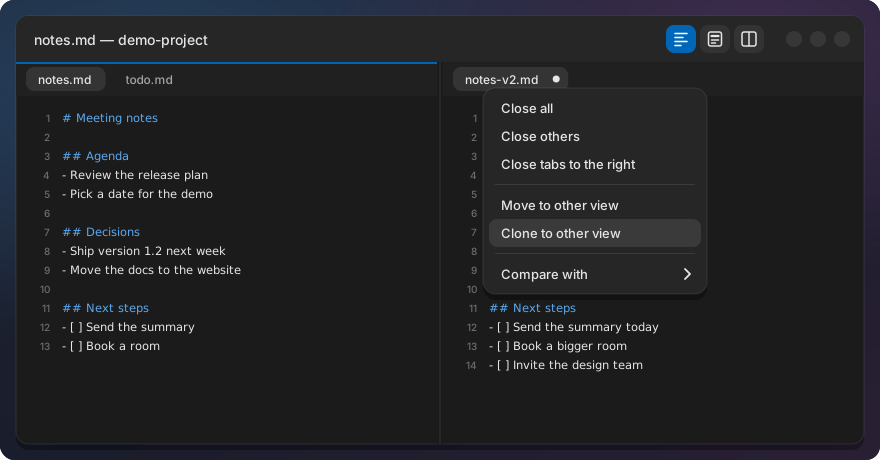
Two views. Two tabs side by side, each with its own tab bar, optionally scrolling together.
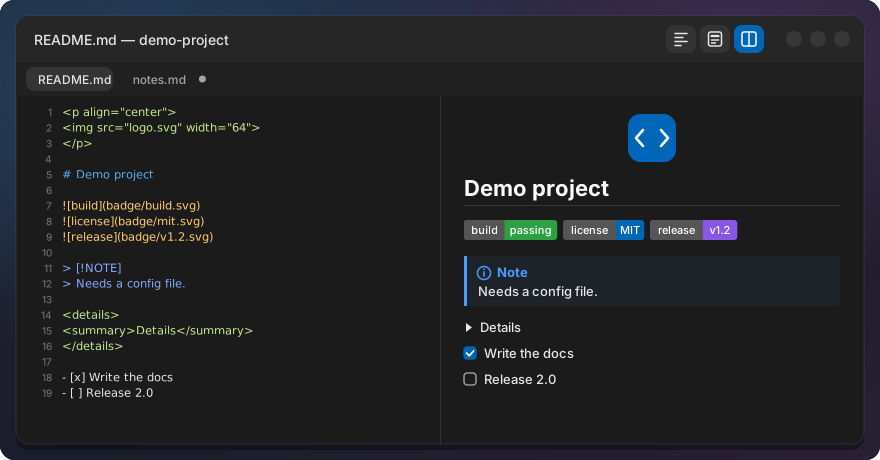
Markdown. Every Markdown tab has three views: Preview, Source and Split. The preview handles the HTML that READMEs use, such as centred logos, badges, <details> sections and GitHub alerts, and colours code blocks like the editor does. An outline panel lists the headings.
Code tools. Format, minify and validate JSON; show whitespace and line endings and convert between LF and CRLF; column selection with Alt and drag; code folding; and Close all tabs.
Why patches, not a fork
A fork would have been the easy start and the hard middle. COSMIC moves fast, and the editor is updated with the rest of the desktop through apt. A fork means I own every upstream change from then on, and anyone who installs it runs my version of the whole editor, not System76’s version plus my changes.
So the editor is a patch series: 57 small commits, one feature or fix each, kept as git format-patch files in the repository. The installer reads the editor version you have installed, checks out exactly that upstream commit, applies the patches and builds.
The taskbar already worked this way, and the editor reuses its small script. apply checks out a commit and applies the series with git am -3, so upstream changes near my lines merge by themselves and only real conflicts stop. check tries the same in a throwaway worktree. dev gives me the series as ordinary commits to edit and amend, rebase moves them onto a new upstream commit, and export writes them back as patch files.
A daily check runs check against the installed version. When apt updates the editor, one notification says whether the patches still apply. When they don’t, the conflict is in one named patch, not somewhere in a fork.
How drafts stay safe
Session restore is the feature that can lose data, so it got the strictest rules. Drafts are written two seconds after you stop typing, and at least every fifteen seconds while you keep going, in the background so typing never waits for the disk. Each write goes to a temporary file that is then renamed, so a crash mid-write leaves the old draft, not half a file. An older snapshot never overwrites a newer one.
The failure rules matter more than the happy path. If a draft cannot be written, because the disk is full or the folder is read-only, closing the window asks to save as before. A session file that cannot be read is set aside, never overwritten, and no draft is deleted in that run.
The changed-on-disk check has one subtle case. Programs that save by writing a new file and renaming it over the old one can keep the same time and size, so the check also compares the inode.
How it was tested
The editor has 197 unit tests, named after the behaviours they check: “closing the window keeps drafts without a prompt”, “save never overwrites an unseen change”. They run against the patched upstream code.
Unit tests don’t click buttons, though. So before the release I ran the whole manual checklist in a hidden headless sway session, driven by a virtual keyboard and pointer, and judged each step from screenshots and the saved files. That run found two data-loss bugs the unit tests had missed. In one, a program replaced a file while I had unsaved edits, the bar appeared, and pressing Save right then wrote over the outside change. In the other, typing right after folding a block edited the hidden lines. Both are fixed, each with a test so it stays fixed. Without the on-screen run, both would have shipped.
What is still checked only by eye: how the rendered page looks, fonts, IME input and the timers. And it is tested on Pop!_OS 24.04 only.
Upstream
I would rather see these features in COSMIC itself. COSMIC does not accept pull requests with AI-generated content, and this code was written with AI assistance, so I described the behaviour on the matching cosmic-edit issues instead, with the repository as a working example: Markdown preview (#247), session restore (#94), and further requests on #134, #495, #261, #136, #644 and #542. Two had no issue yet, so I opened them: the changed-on-disk bar (#660) and column selection (#661). If you want one of them too, add a 👍 or your use case there.
If a maintainer picks one up, the patch for it goes away. That is the best outcome a patch series can have.
Install
The editor is part of COSMIC Desktop Extras, since v0.2.0:
git clone https://github.com/jwillmer/cosmic-desktop-extras.git
cd cosmic-desktop-extras
./install.sh text-editor
It needs Rust and a few build packages; the installer offers to install them. Afterwards, close and reopen the Text Editor. To go back to the stock editor:
./install.sh --uninstall text-editor
The launcher, the dock and double-clicking a file start COSMIC’s own Text Editor again. Your session and drafts stay on disk.
The full feature list, settings and known limits are in the Text Editor README. If something does not work on your machine, open an issue.